How to Get Your Clinic Into Google's AI Overview (Step by Step)

Vishnu Swaroop Lal
Clinic growth expert, founder of MangoEyes
Published 28 October 2026
10 min read
Short on time? Summarise this guide with:
The clinic growth newsletter
One step-by-step guide a week, for clinic owners
How patients find clinics on Google, ChatGPT and Instagram, and how to win them. Each guide comes with the video and the podcast episode.
By subscribing you agree to receive emails from MangoEyes. Unsubscribe any time. See our privacy policy.
Do you want your clinic to show up in Google's AI answer, or to be the clinic ChatGPT recommends when a patient asks? In this guide I show you how to do it, step by step, and I show you where we're already doing it for a client clinic. Everything here uses free tools. You can start today.
If you prefer to watch, the full video is above: I click through every step on screen. Below, you get the same steps written out, with a screenshot for each click.
Why is the AI Overview where patients go now?
Instead of making a patient open one link after another, Google now puts the answer at the top, in the AI Overview. There's an important lesson in that. Google already has more traffic than anyone, and it still studies how people behave.
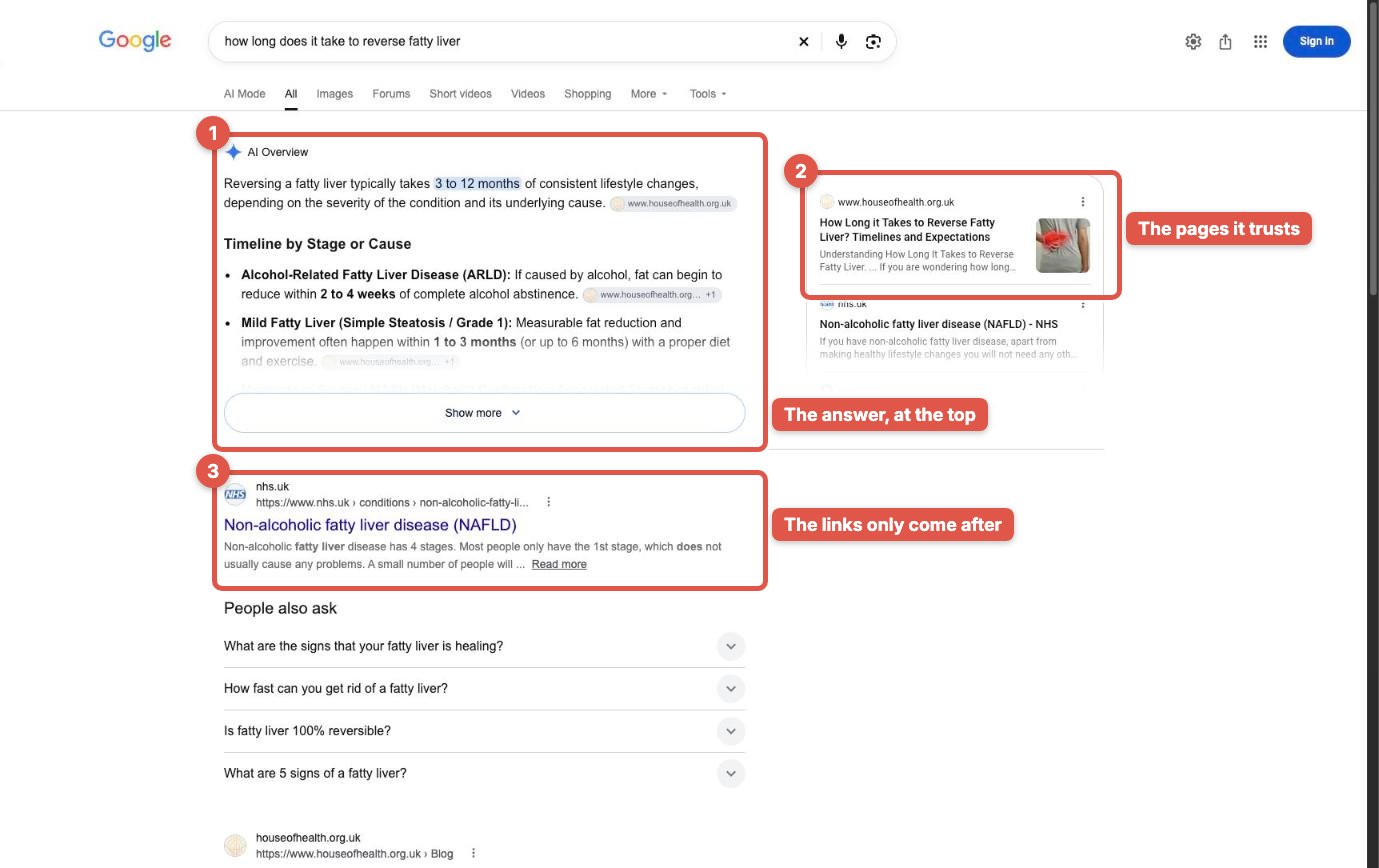
People are losing patience. They don't want to read through long pages of links. They want the final answer. If Google doesn't give it to them, it risks the reputation it has built over many years. So it added the AI Overview, and it looks for the people who give that answer on their own blog and their own website.
What does that mean for you? If a company that size takes this much care of its users, and you're the expert, working with patients who come to you worried and looking for safety and trust, how much more should you think about this?
And there's an opportunity here. If you're not in that overview, you're losing those patients before they ever see you. Very few clinics are doing anything about it yet, which means the clinics that start now get there first.
Is a clinic really shown next to WebMD and Healthline?
Yes. We work with aesthetic clinics, med spas and medical clinics, and this is one of our clients: House of Health. A patient asks Google: how long does it take to reverse fatty liver? Look at the sources. WebMD. Healthline. Big organisations we all trust. And right beside them, House of Health.
Not a hospital, not a national website. A clinic.
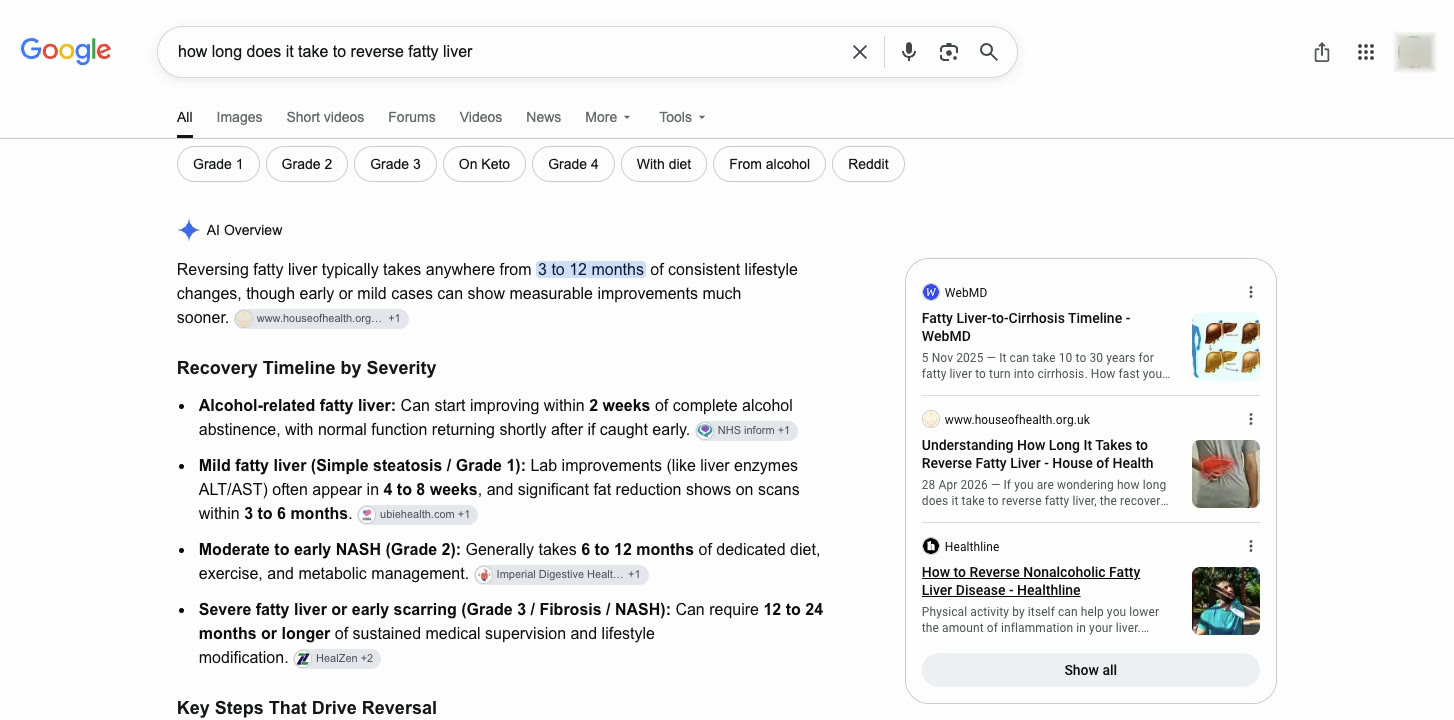
And this is the page that got them there: one clear answer to one patient question, written for patients, on their own website. No trick, no paid placement. The page answered the question better than most pages on the internet, so Google used it.
House of Health is a medical clinic, so its examples are about the liver. The method is exactly the same for an aesthetic clinic: your questions will be about microneedling, filler, skin boosters, acne scars or hair removal.
What has changed in the way patients search?
A patient almost never starts with a device, and very rarely with a treatment. She starts with a worry, and she asks it as a question. Will this help my acne scars? How long until I see results? Is it safe for my skin type? What should I avoid afterwards?
Today she asks Google or ChatGPT, and the answer is built from pages that explain things well. Google takes her long question, breaks it into smaller ones, and looks for the page that answers each part.
So the question for you isn't which offer to post this week. It's which questions you're already close to answering. And Google shows you that, for free, in Search Console.
Step 1: How do I find the questions my clinic already shows up for?
Open Google Search Console. If your website is connected, it's free. If it isn't, ask whoever manages your website to verify it; it takes a few minutes and you only do it once.
- In the menu on the left, click Search results.
- At the top, choose the last 3 months, so you see a full season of searches, not one unusual week.
- Check that the search type is Web.
- Click the Total impressions box, so impressions show in the table.
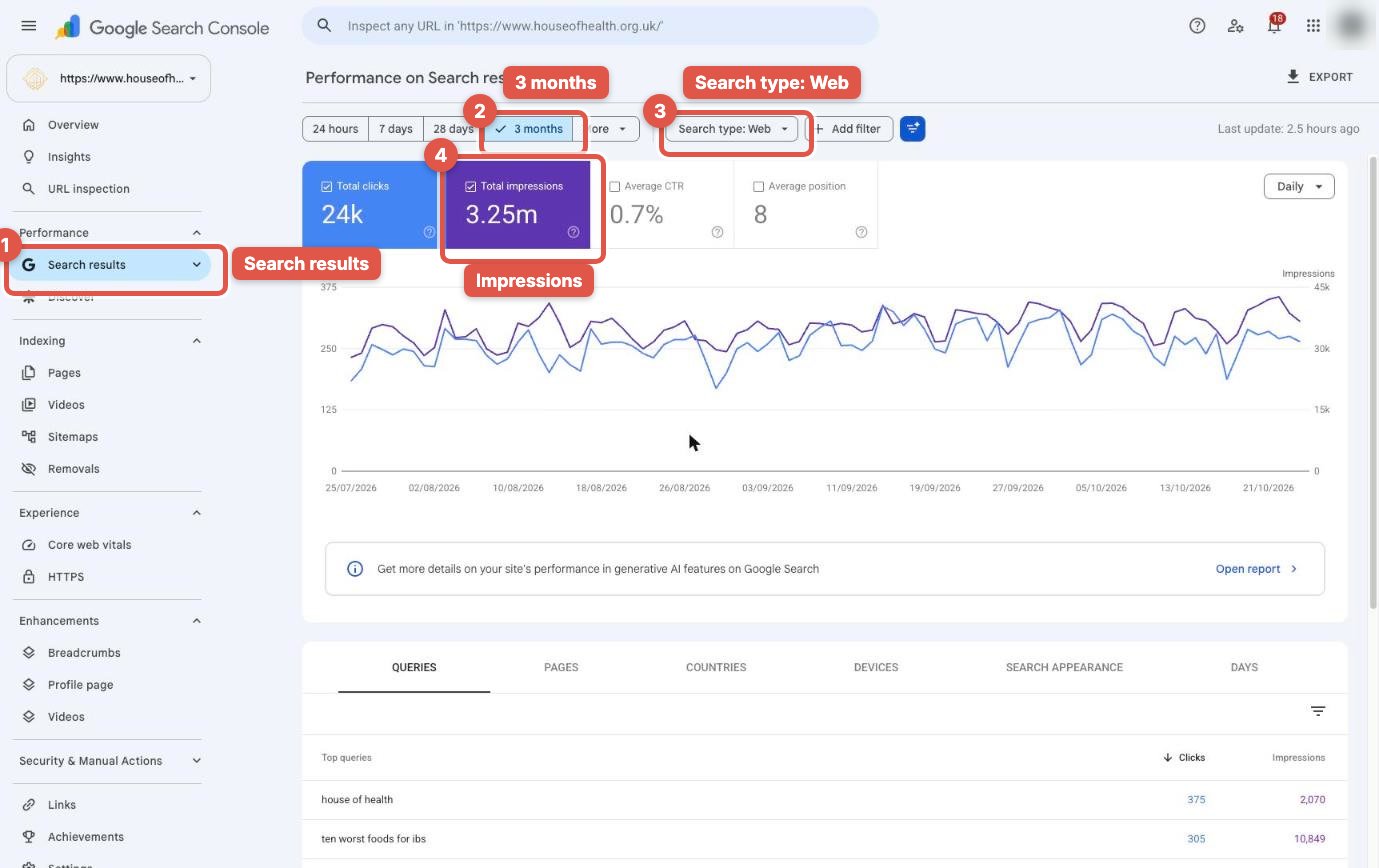
An impression means your page appeared when someone searched. A click means they chose you. Those two numbers together tell you everything you need for this step.
Now scroll down to the table. On the Queries tab, click the Impressions column, so the questions you're shown for most sit at the top.
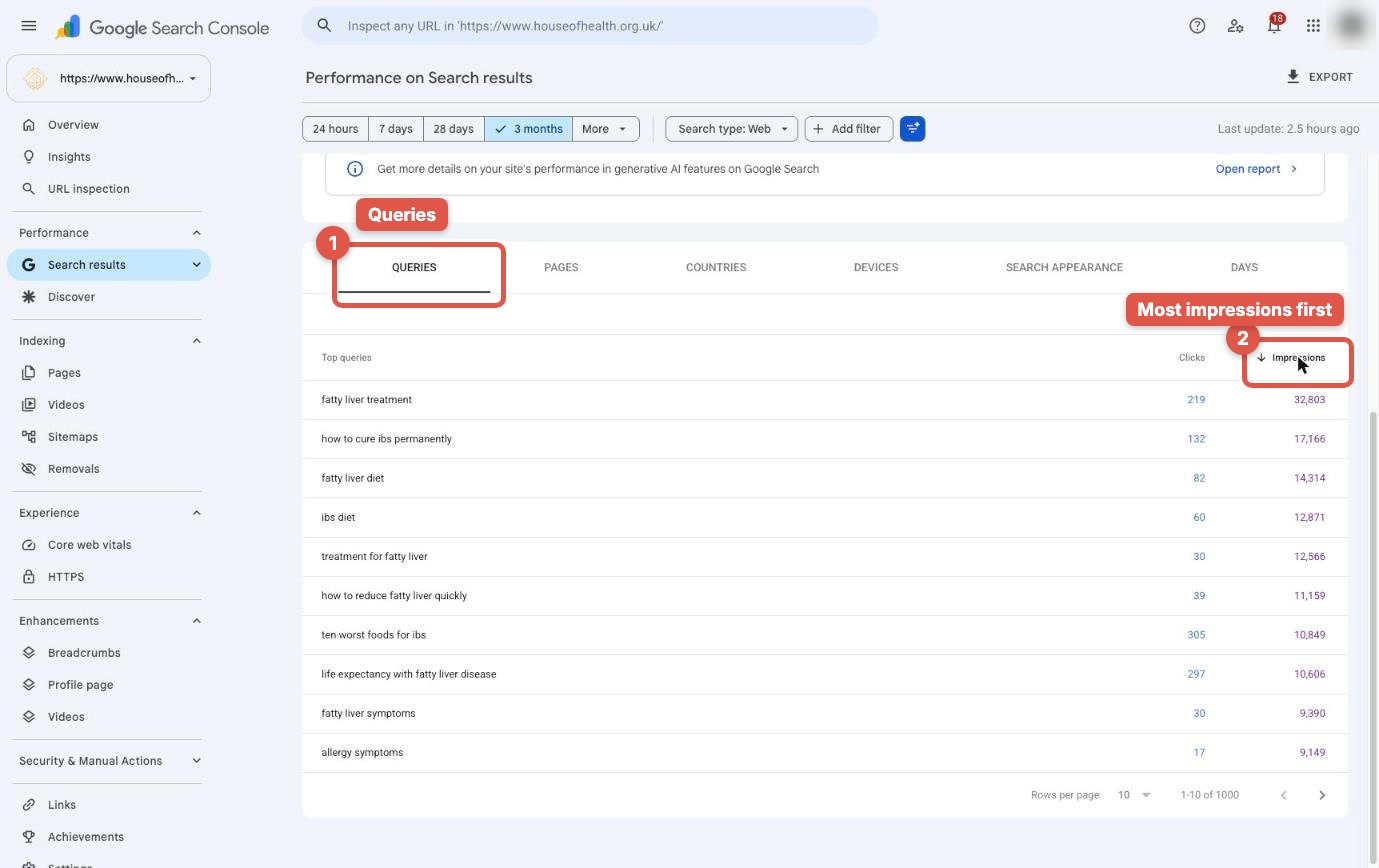
Then click Clicks, so it sorts fewest first. Look for the rows where thousands of people saw you, and almost nobody clicked.
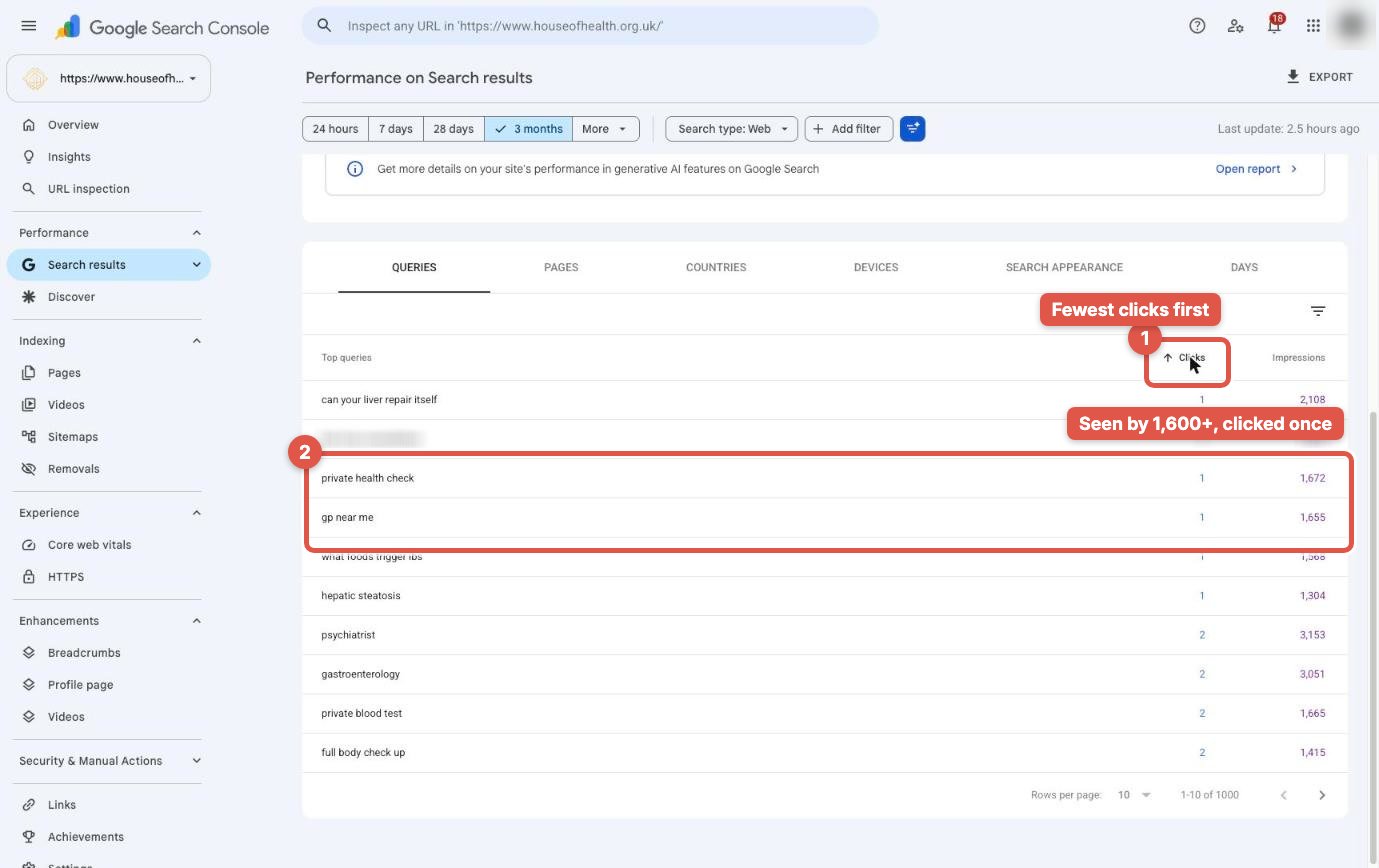
That's Google telling you two things. Patients are asking this. And your page is close, but it isn't the best answer yet. Google already trusts your website enough to show it; it just found a better answer somewhere else.
Write down your top ten. That's your content list for the next ten weeks, and you didn't have to guess a single topic.
Step 2: How do I find the page that should be winning?
Click one of those questions, then open the Pages tab. Google shows you which page on your website it's showing for that question. That's the page you need to make stronger. Don't create a new page yet: improving the page Google already picked is usually faster.
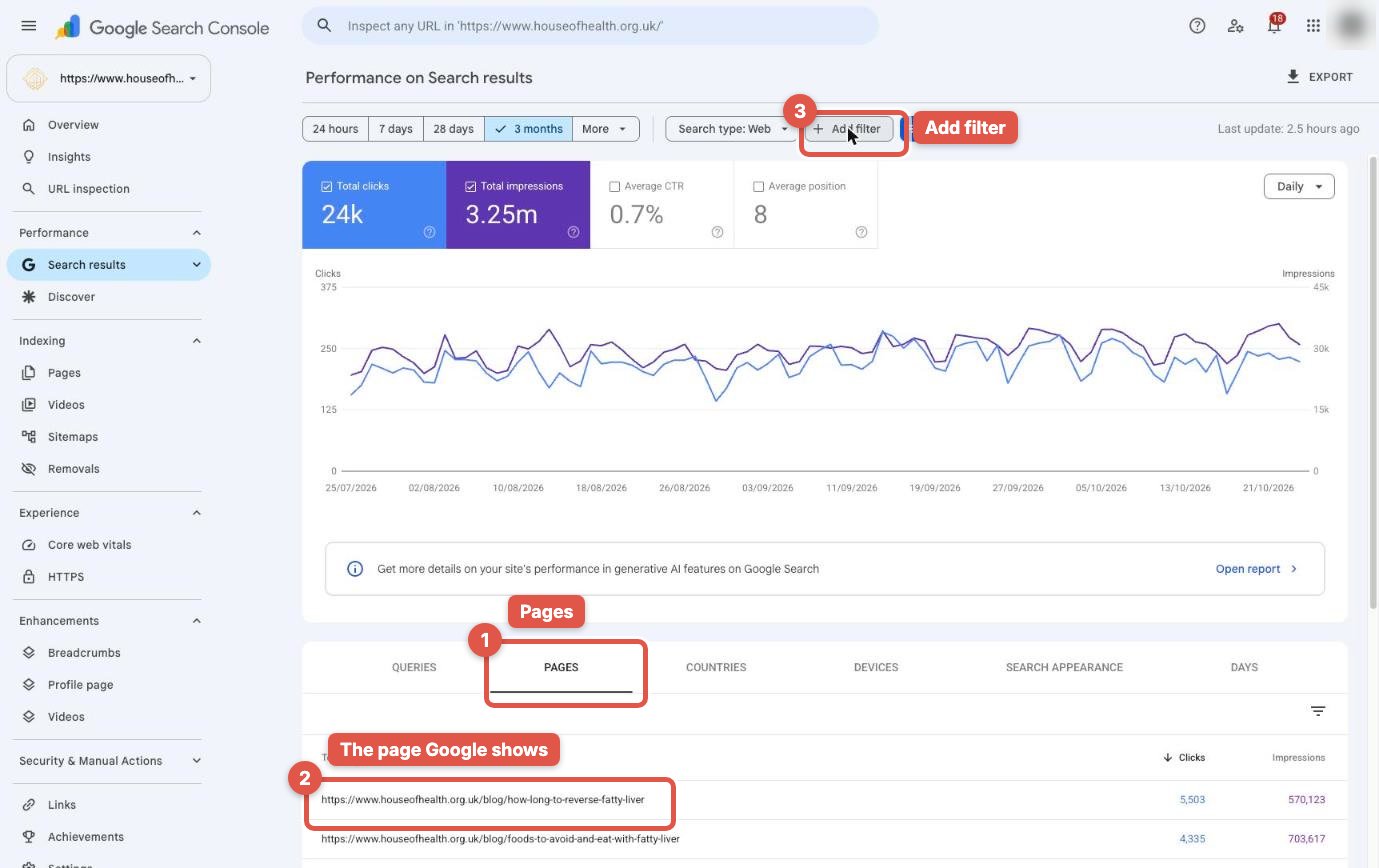
Copy that page's address. Remove the question filter, click Add filter, choose Page, then URLs containing, and paste the address in. Click Apply.
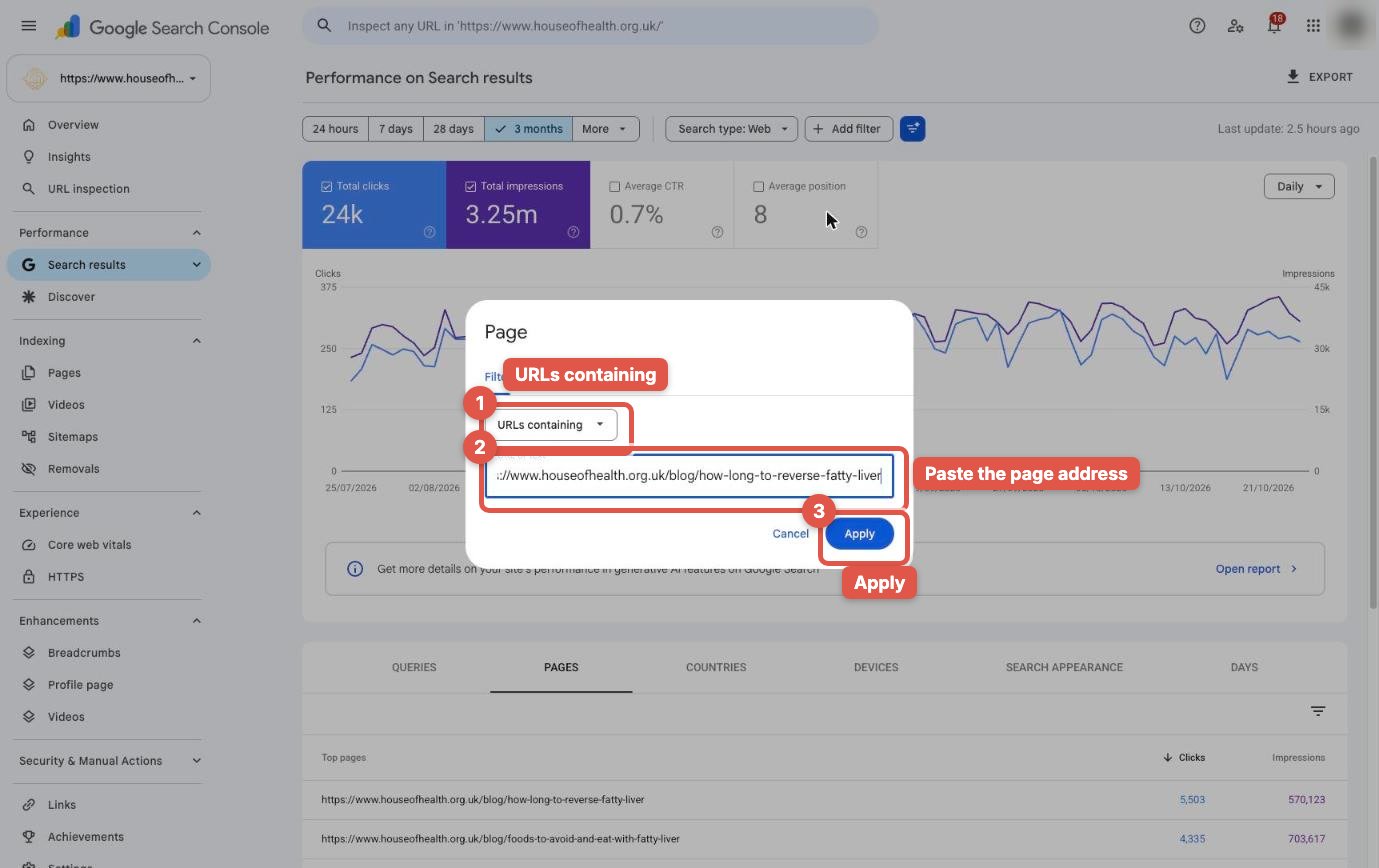
Now open Queries again. This is every question that one page is shown for.
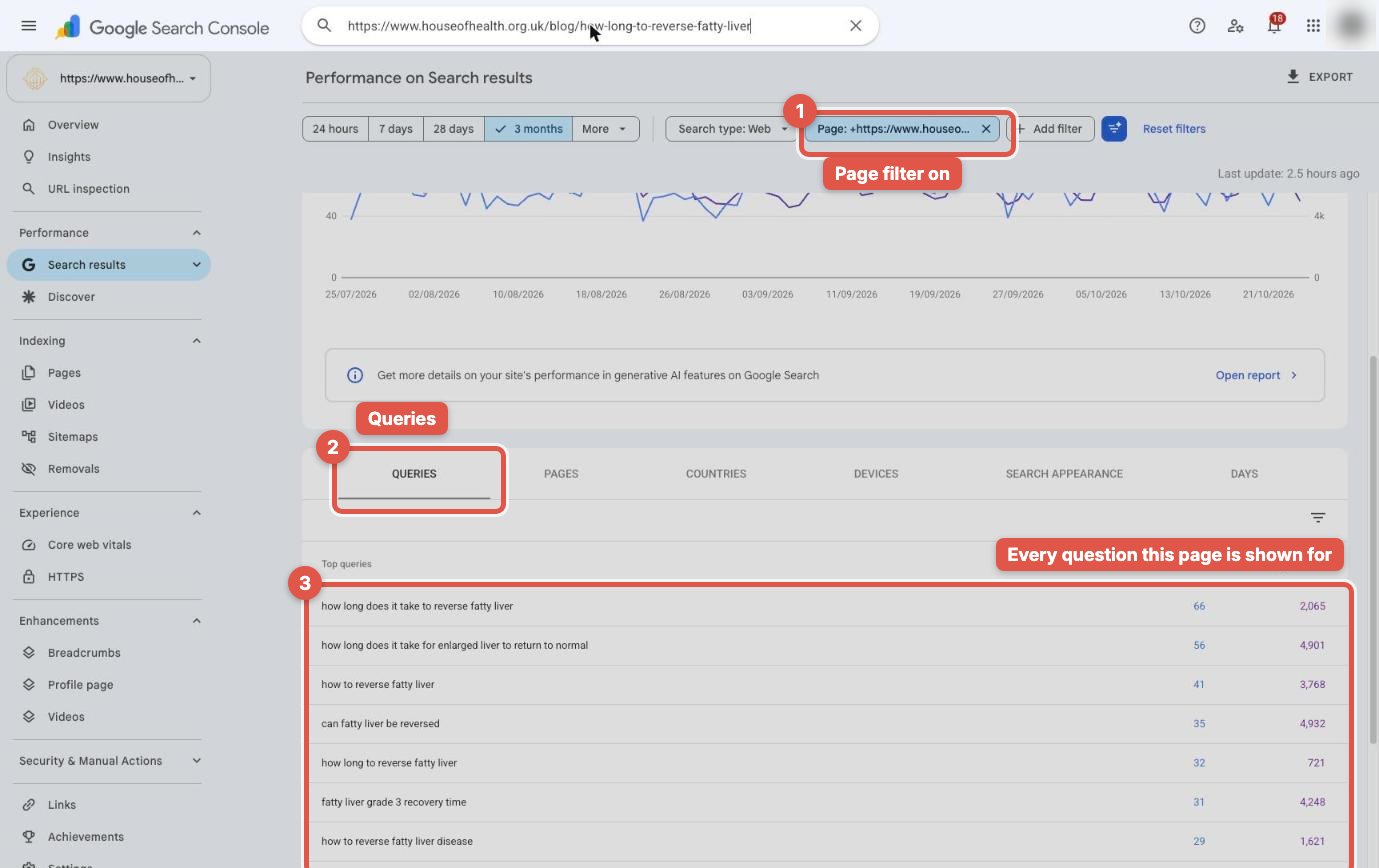
You'll usually see the same worry asked many ways. Hundreds of impressions, and sometimes no clicks at all. Each one of those questions is a heading that page is missing, a short video your practitioner can record, or a question for the FAQ.
The clinic growth newsletter
One step-by-step guide a week, for clinic owners
How patients find clinics on Google, ChatGPT and Instagram, and how to win them. Each guide comes with the video and the podcast episode.
By subscribing you agree to receive emails from MangoEyes. Unsubscribe any time. See our privacy policy.
Step 3: How do I answer it in every format, on my own website?
Ask one practitioner to answer that question on camera, in plain words, the way they would in a consultation. A phone is enough. One to three minutes is enough. What matters is that a real expert answers a real patient question.
Then build the page around it:
- Video. Put the video on YouTube, so Google can find it, and add the same video to that page on your website.
- Text. Write the answer underneath, with the question as the heading. Answer it in the first two sentences, then explain.
- Images. Add your own images: the treatment room, before-and-after photos where you have consent, a simple diagram of the timeline. Not stock photos.
- Audio. Add an audio version to the page, not only to Instagram. Some patients would rather listen.
- FAQ. Add the other questions from Step 2 as short questions and answers at the end.
Why every format? Because Google doesn't only show text. It has Images, Short videos and Videos tabs, and each one is another chance for a patient to find you. The page that has all of them is the most complete answer on the internet, and that's the page Google wants to cite.
And now you know what to post on Instagram and TikTok too. The same questions, cut short, pointing back to the full answer on your website.
What does a page that wins look like?
Look at the House of Health page Google cites. It isn't long for the sake of being long. It does five things well:
- The question is the heading. The patient's words, not a clever title.
- The answer comes first. The first two sentences give the direct answer, with a realistic timeline.
- Then the detail. What changes the answer, stage by stage, and what the patient can do.
- It's written for patients. Plain words, no jargon without an explanation, and a clear next step.
- It's on the clinic's own website. Not only on Instagram, where Google can't use it as a source.
A worked example for an aesthetic clinic
Say Search Console shows your microneedling page appearing for "how long does microneedling take to work", "how many microneedling sessions do I need" and "microneedling downtime", with thousands of impressions and very few clicks. Here's how that page could look after this step:
| Section | What goes in it |
|---|---|
| Heading: How long does microneedling take to work? | Two-sentence answer from your practitioner: when patients usually see a change, and when the full result shows. |
| Practitioner video | Your practitioner answering the same question on camera, one to three minutes. |
| How many sessions do I need? | The usual course for scarring, texture or fine lines, and why it differs. |
| What is the downtime? | What the skin looks like on day one, day three and day seven, with your own photos where you have consent. |
| Is it safe for my skin type? | Who it suits, who should wait, and why a consultation matters. |
| FAQ | The smaller questions from Search Console, each answered in two or three sentences. |
Every row in that table came from a question patients already asked Google. You didn't guess any of it.
Step 4: How do I ask Google to index the page?
When the page is updated, go back to Search Console. Paste the page address into the inspection bar at the very top, and press Enter. When the result loads, click Request indexing.
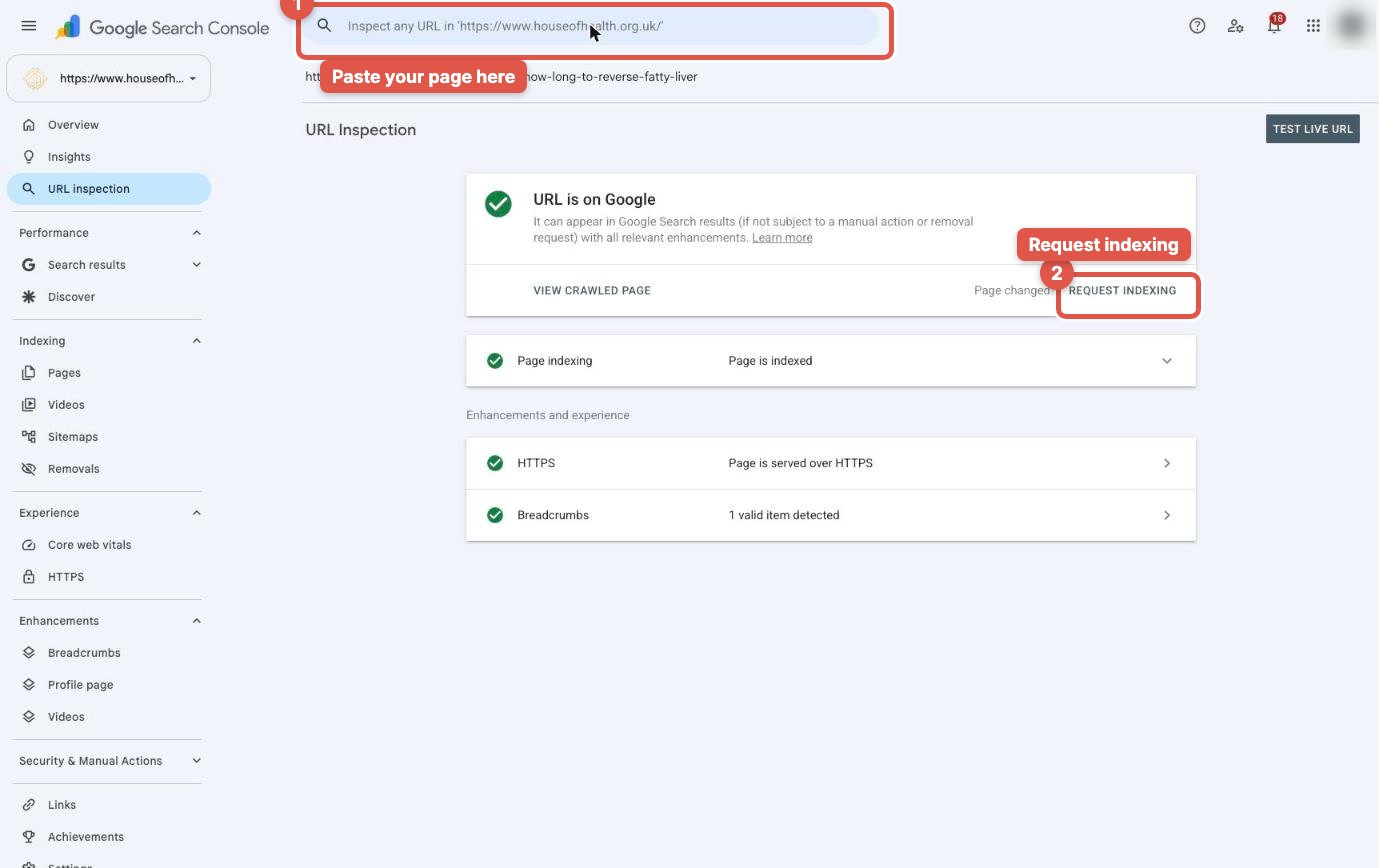
That tells Google the page has changed, so it comes back and reads it sooner instead of waiting for its next routine visit.
Step 5: How do I check where my clinic appears?
Now search the question yourself. First, the AI Overview. Look at the sources on the right. Is your page there? For House of Health, it is, beside WebMD and Healthline, because the page answers the question properly.
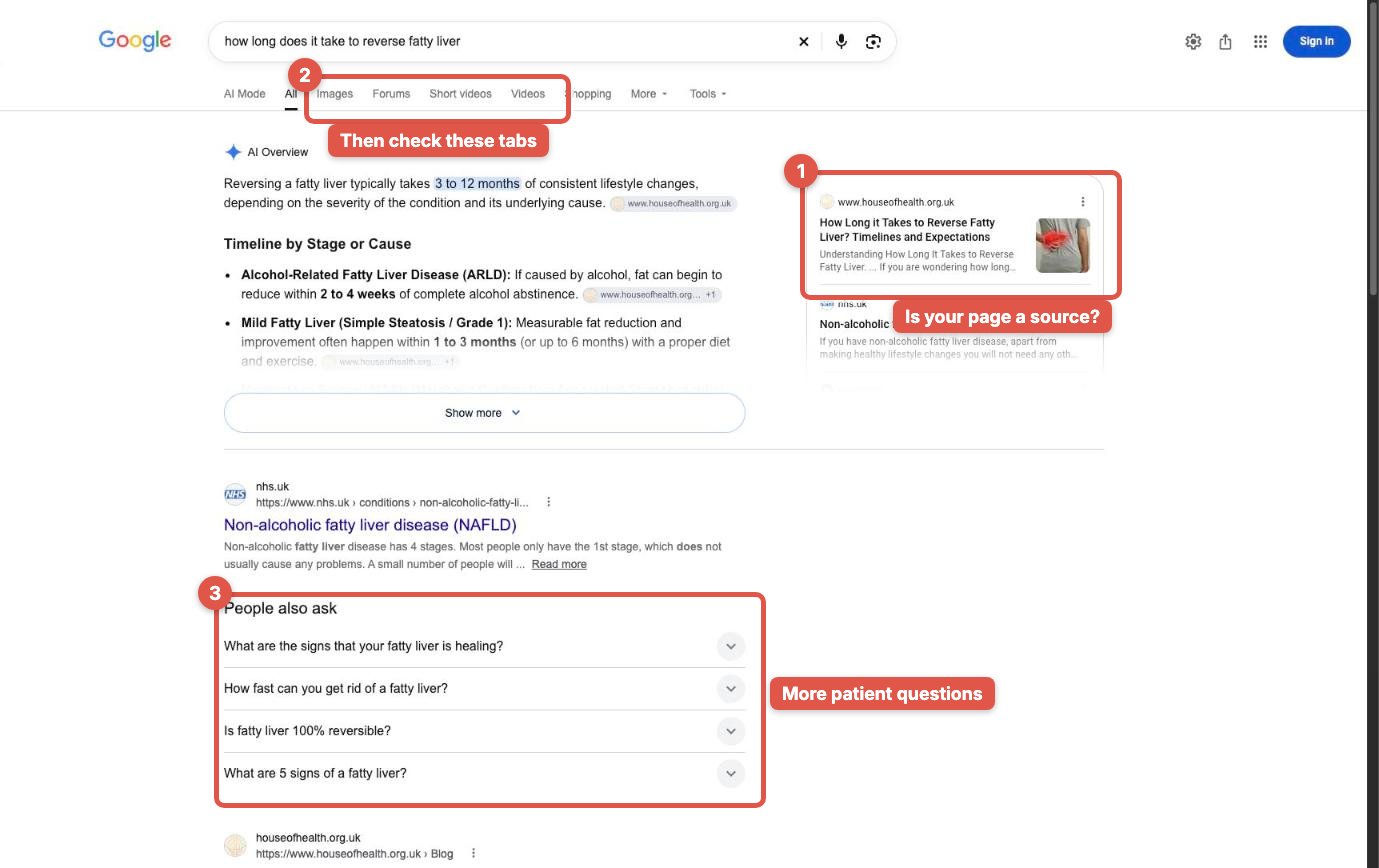
Look at People also ask too. Those are more questions patients ask about the same worry. Add the good ones to your page's FAQ.
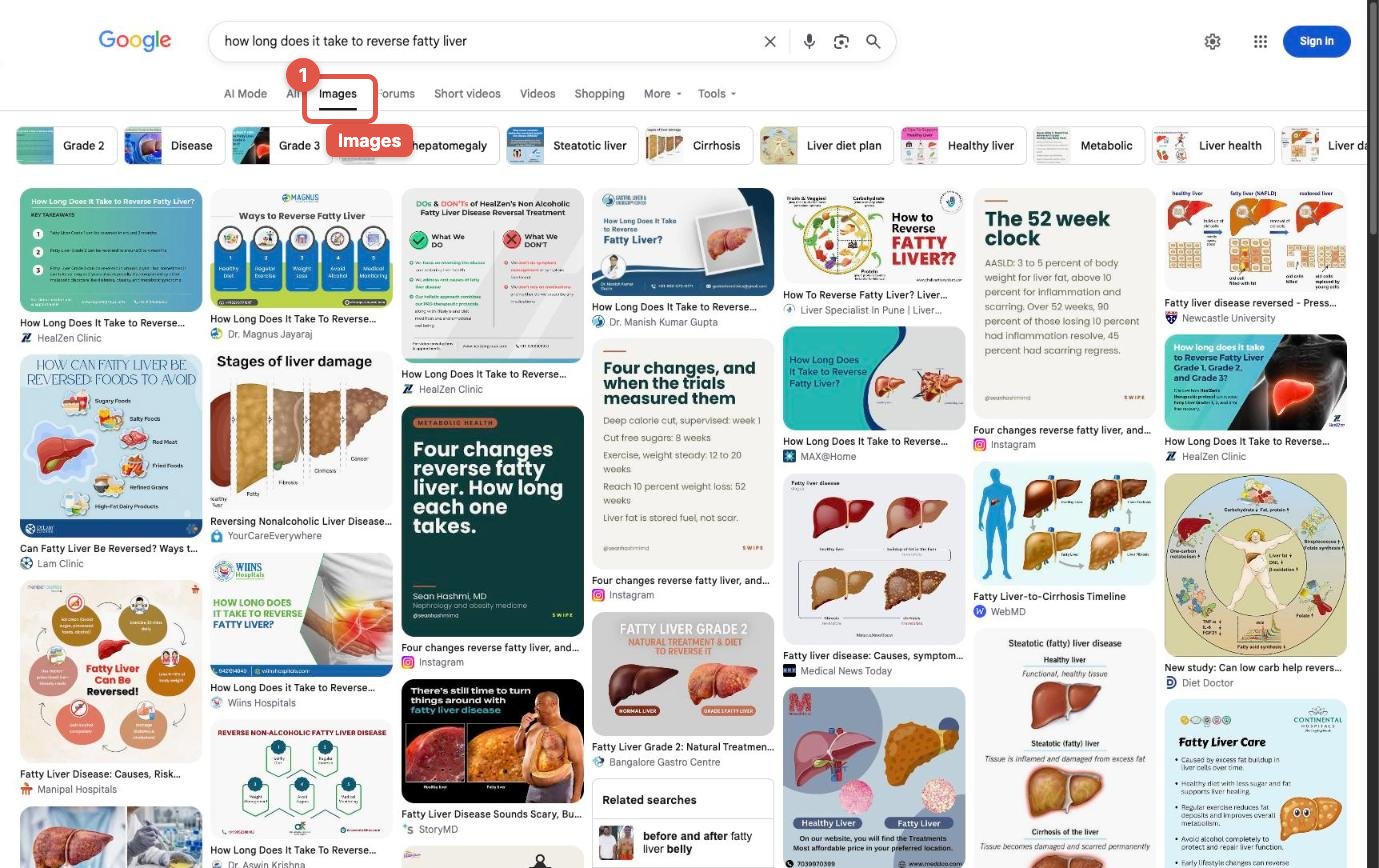
Then click Images. Are your images there? For House of Health, here, they aren't. That's the next thing to make.
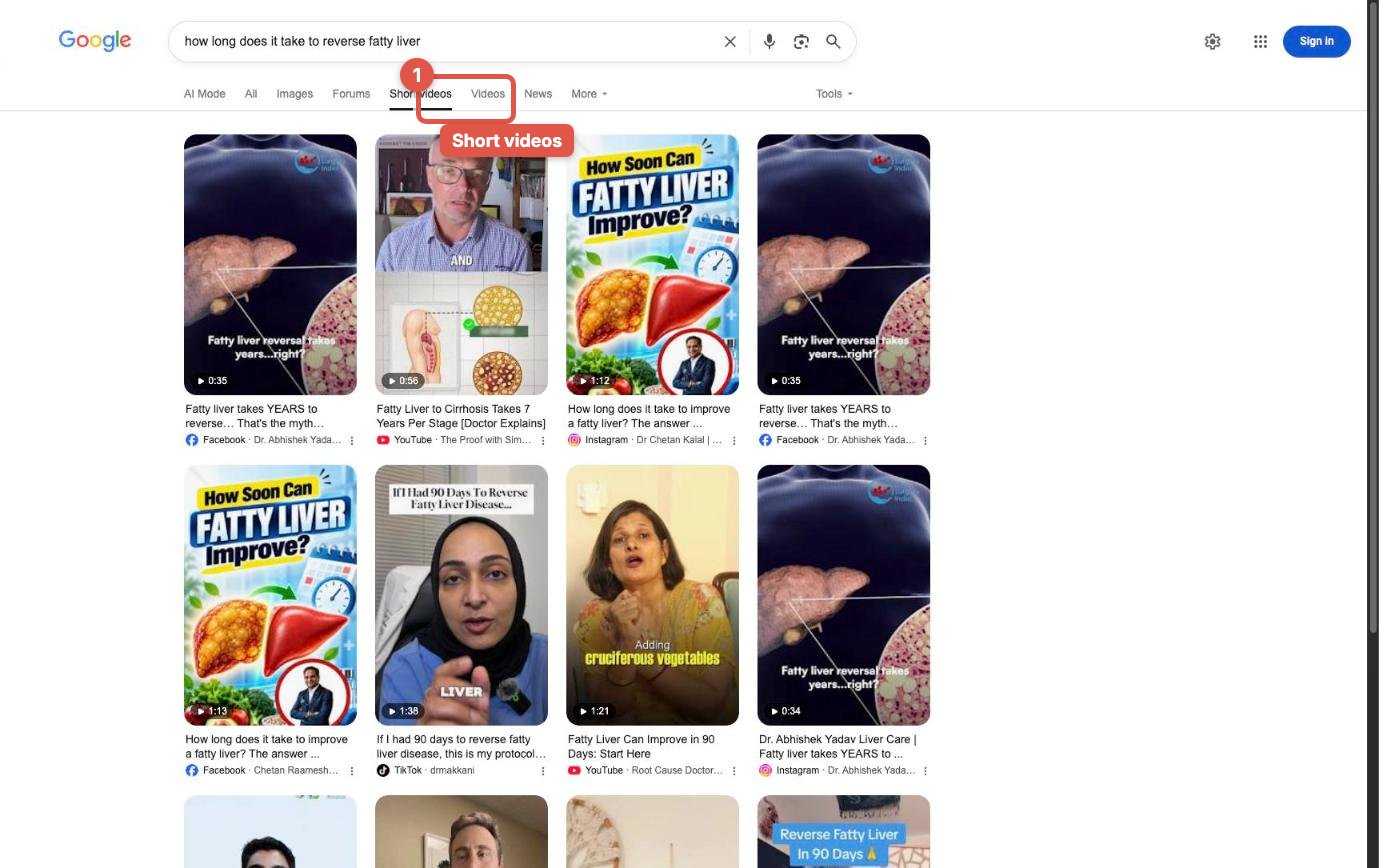
Click Short videos. Their reel only appears far down the page.
And under Videos, there's nothing of theirs at all, only YouTube channels.
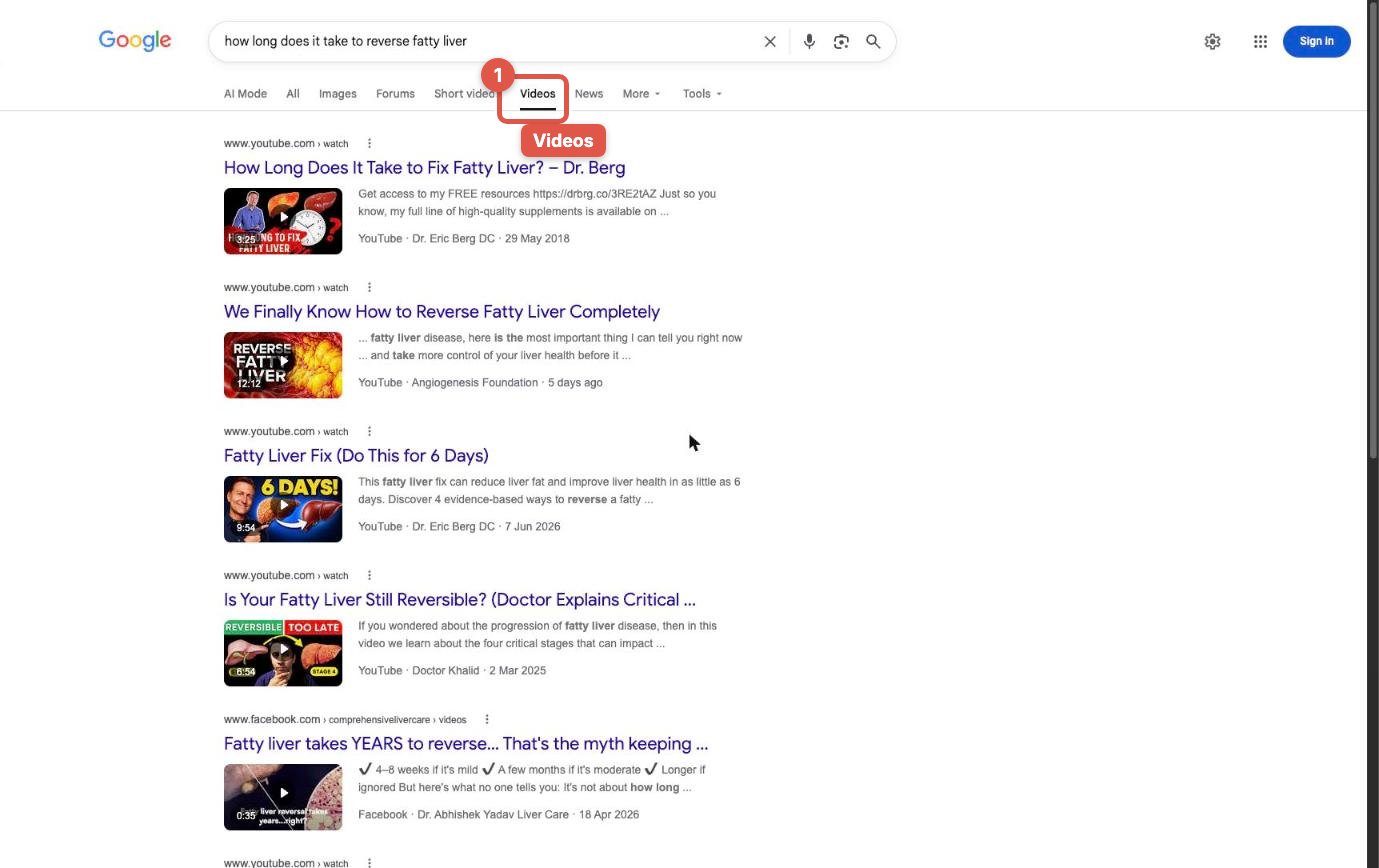
Every tab where you're missing tells you what to make next. You can check the same thing in Search Console: change the search type to Image or Video, and see what you're already shown for.
What are the most common mistakes clinics make?
We see the same five mistakes on almost every clinic website we audit:
- Only treatment pages. A page called "Microneedling" with a price list answers none of the questions patients type. Keep the treatment page, and add the answers to it.
- Answers only on social media. A great reel on Instagram helps on Instagram. Google's AI Overview cites web pages, so the full answer has to live on your website too.
- Stock photos. Patients and Google can both tell. Your own room, your own practitioner and your own results (with consent) are what make the page yours.
- Writing for other clinicians. If a worried patient can't follow it, it isn't the answer she's looking for. Explain every term once, in plain words.
- Doing it once. One page won't change much. The clinics that win treat this as a weekly habit: one question a week, every week.
Does this help with ChatGPT too?
Yes. ChatGPT and other AI assistants also answer from pages that explain things clearly, and many of them search the web before they answer. A page that answers one patient question properly, with an expert behind it, is the kind of page they quote. You don't need a separate strategy for each AI tool. You need the best answer on the internet, on your own website.
The loop: one question a week
So here's the loop. Find the questions you're already shown for. Find the page that should be winning. Answer it in every format, on your own website. Ask Google to index it. Then check where you appear.
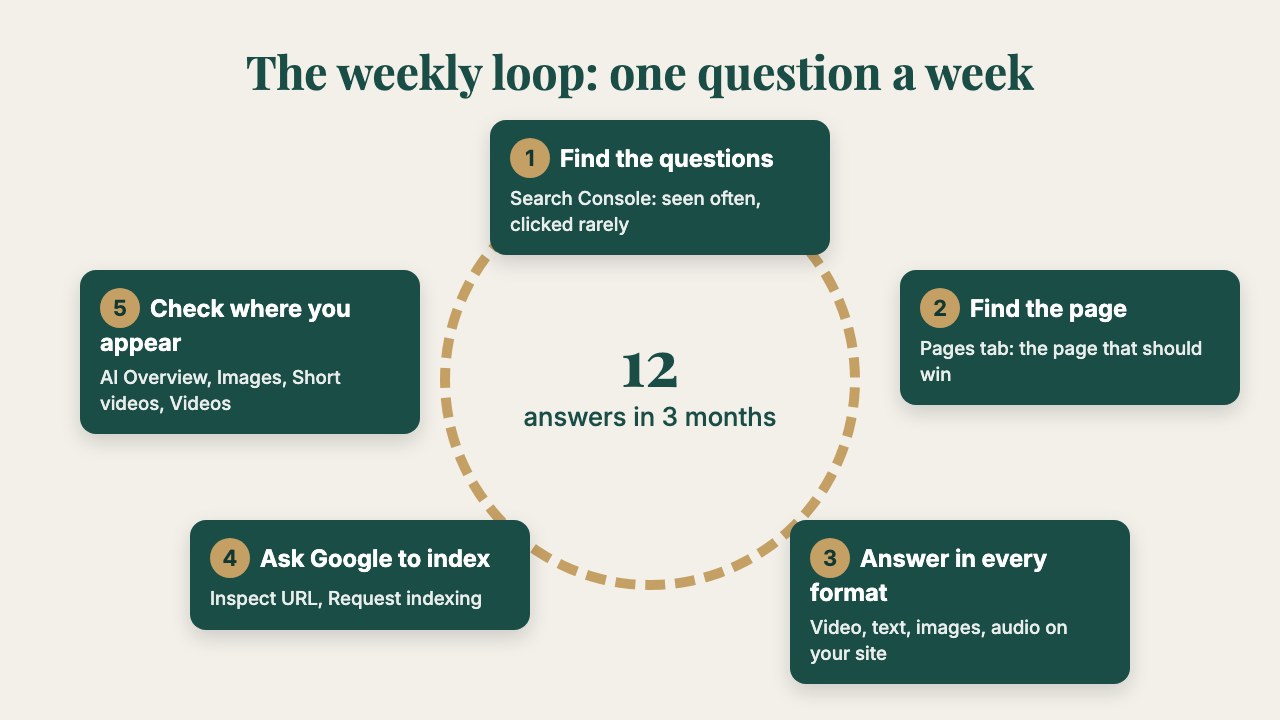
One question a week. In three months, that's twelve answers working for you every night, while patients are asking.
Patients are learning faster than ever, and they learn from whoever explains it best. Make sure that's you.
If you'd like us to do this for your clinic, from finding the questions to recording the answers and getting them indexed, book a consultation.
Short on time?
Summarise this guide with AI
Frequently asked questions
›What is Google's AI Overview?
It is the AI-written answer Google shows at the top of many searches. It summarises the answer and lists the web pages it used as sources on the right. Patients often read it instead of scrolling through the links.
›Can a small clinic really appear next to WebMD and Healthline?
Yes. Google picks the page that answers the question best, not the biggest brand. House of Health, one of our client clinics, is cited between WebMD and Healthline for a patient question, with a single page written for patients on its own website.
›Is Google Search Console free?
Yes. Search Console is free. Your website has to be connected (verified) once; after that it shows which searches your pages appear for, how often (impressions) and how often patients click.
›What is the difference between an impression and a click?
An impression means your page appeared in the results when someone searched. A click means they chose your page. Many impressions with almost no clicks means Google already sees your page as close to the answer, but it isn't the best answer yet.
›How long does it take to appear in the AI Overview?
There is no fixed time. After you improve a page and request indexing, Google usually recrawls it within days to a few weeks. Pages that answer one patient question clearly, with their own video and images, are the ones we see cited.
›Do I need a video for every question?
It helps a lot. A short practitioner video answering the question can appear in Google's Videos and Short videos tabs, and the same video on your page gives patients a reason to stay. Start with your top ten questions.
›Should I use AI to write the answers?
Use your practitioners' real answers. AI can help tidy the wording, but the expertise, the examples and the safety advice should come from the person who treats patients. That is what makes the page worth citing.
Listen to this guide
Clinic Growth Explored, the podcast
The clinic growth newsletter
One step-by-step guide a week, for clinic owners
How patients find clinics on Google, ChatGPT and Instagram, and how to win them. Each guide comes with the video and the podcast episode.
By subscribing you agree to receive emails from MangoEyes. Unsubscribe any time. See our privacy policy.